
The Gift card template displays a Shopify gift card's balance, QR code, code-copy action, expiry state, and available wallet action. Its Gift card section lets you customize the short instructions customers see around the QR code and gift-card code.
When this template appears
Shopify renders this page for a gift card. In the Theme Editor, open the Gift card template and select its Gift card section. The section is part of the template rather than a general Theme settings panel.
Gift card settings
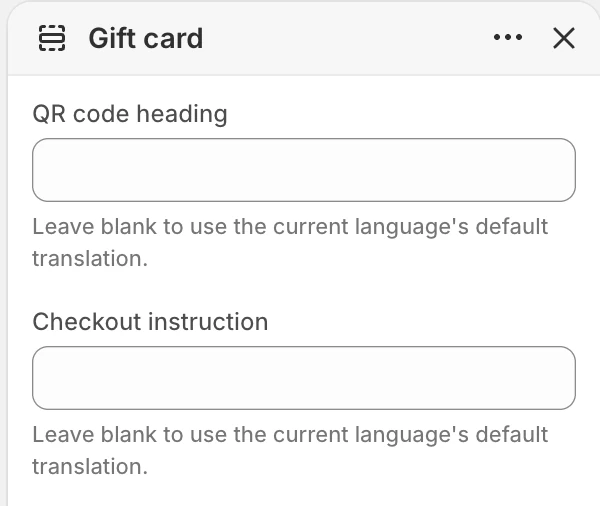
The settings at the top of Gift card. The values shown are examples, not defaults.
| Setting | What it controls | Fallback when blank |
|---|---|---|
| QR code heading | Short label shown above the QR code. | Uses Shopify's translated QR-code label for the current storefront language. |
| Checkout instruction | Explains how the customer should use the gift-card code at checkout. | Uses Shopify's translated checkout instruction for the current storefront language. |
Keep both fields short and action-focused. Leaving them blank is useful when the store relies on Shopify's translated wording across multiple languages.
Page content
The page can include:
- a Gift card QR code;
- the gift-card balance;
- an expiry message when the gift card is expired;
- an expiry date when one exists;
- the gift-card code;
- a Copy gift card code action with a
Copiedstatus; - an Add to Apple Wallet action when a wallet URL is available;
- a Continue shopping action.
The exact balance, code, expiry, and available wallet action come from the gift-card record. Never place a real gift-card code in a screenshot or support request.
States to review
Review these states without exposing a real code:
- active gift card without an expiry date;
- active gift card with an expiry date;
- expired or disabled gift card;
- gift card with and without an Apple Wallet action;
- copy action before and after activation.
Desktop and mobile behavior
Review QR-code legibility, code-copy feedback, wallet action layout, expiry messaging, and the Continue shopping action at desktop and mobile sizes.
Accessibility and motion
The QR code has a text alternative, the copy action has an accessible label, and copy feedback is announced. Review the page with a keyboard and assistive technology.
Media recommendations
This page does not use merchant-uploaded media. Do not include QR codes, gift-card codes, store names, or customer details in screenshots or support requests.
Common checks
- If the wallet action is absent, confirm that the gift card has a wallet URL; it is not a Theme Editor toggle.
- If the expiry message is absent, verify the gift-card record's active/expired state.
- If copying does not provide feedback, record the browser and device before contacting support without sharing the gift-card code.